 Celebrate with up to 80% off
New NIST password guidelines: What changed and how to stay compliant


The National Institute of Standards and Technology (NIST)’s current password guidance discourages forced periodic password changes, password hints, security questions, and arbitrary composition rules. It instead emphasizes longer passwords, blocklist screening for compromised or commonly used passwords, rate limiting, password managers, and phishing-resistant authentication options.
What are NIST password guidelines?
NIST password guidelines are part of NIST’s broader Digital Identity Guidelines. They explain how organizations should handle authentication, including passwords, passkeys, one-time codes, multi-factor authentication (MFA), account recovery, and secure authenticator management.
These guidelines set requirements for federal digital identity systems, but many companies, security teams, and compliance professionals also use them as a trusted baseline.
For password policies, the relevant standard is NIST Special Publication (SP) 800-63B-4, published in July 2025. It focuses on authentication systems that reduce security risks without relying on frustrating password requirements or leading to weaker habits.
NIST also publishes the broader cybersecurity framework, which helps organizations understand and manage cybersecurity risk beyond passwords and authentication.
Overview of NIST
NIST is a U.S. government agency within the Department of Commerce. It develops measurement science, technical standards, and guidance that support security, reliability, and innovation across many industries.
NIST’s work covers areas such as communications, health records, electric grids, computer chips, building safety, and cybersecurity. It helps create the technical foundation that many public and private systems rely on.
For cybersecurity, NIST publishes widely used frameworks and guidance that help organizations manage risk, protect systems, and improve security practices. Its password guidance is part of this broader work, giving organizations a trusted baseline for modern authentication and password policy.
What SP 800-63B-4 covers
SP 800-63B-4 covers authentication and authenticator management. It explains how organizations should verify that someone trying to access an account has control of an approved sign-in method, such as a password, passkey, one-time code, or security key.
The publication defines technical requirements for three Authenticator Assurance Levels (AALs), which help organizations match authentication strength to risk. A low-risk service, for example, may not need the same login protections as a system that stores sensitive personal, financial, or business data.
For password security, SP 800-63B-4 covers areas such as:
- Password length and composition rules
- Password screening against commonly used, expected, or compromised passwords
- Login attempt limits
- Password reset and recovery processes
- MFA
- Authenticator lifecycle management
Who needs to follow NIST password guidance
U.S. federal agencies and contractors that build or manage federal digital identity systems must follow NIST guidelines.
For private companies, NIST password guidance isn’t mandatory. However, NIST guidance is especially useful for:
- IT and security teams updating password policies.
- Compliance teams documenting authentication controls.
- Organizations handling sensitive customer or employee data.
- Software-as-a-Service (SaaS) platforms designing account login and recovery flows.
- Businesses reducing credential stuffing, phishing, and password reuse risks.
What changed in the latest NIST password guidelines?
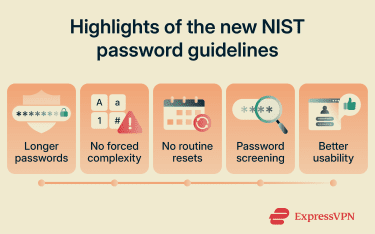
NIST’s latest password guidance shifts the focus from rigid password rules to stronger, more usable authentication. The biggest changes include:
- Longer passwords: Passwords used as the only authentication factor must be at least 15 characters long.
- Fewer arbitrary rules: Organizations shouldn’t require specific character mixes, such as one uppercase letter, one number, or one special character.
- No routine password expiration: Passwords should be changed when there is evidence of compromise, not on a fixed schedule.
- Password screening: New and changed passwords must be checked against blocklists of common, expected, or compromised passwords.
- No password hints or security questions: Recovery methods shouldn’t rely on personal information that attackers may guess, find, or steal.
- Better usability: Organizations should allow password managers, auto-fill, and longer passphrases so secure behavior is easier for users.
Key requirements of NIST password guidelines in 2026
The latest NIST password guidelines focus on a few core ideas: make passwords long enough to resist guessing, screen them against risky choices, protect login flows from abuse, and store credentials in a way that limits damage if systems get breached. NIST also treats passwords as only one part of authentication, especially for higher-risk accounts.
Password length and usability requirements
NIST prioritizes longer passwords over forced complexity rules. Passwords used as the only authentication factor must be at least 15 characters long. Passwords used as part of MFA can be shorter but must still be at least eight characters. Systems should also allow passwords of at least 64 characters.
Every extra character in a password significantly increases the number of guesses an attacker may need to try to break into an account or service. A short password that includes a number or symbol can still be weak if it follows a predictable pattern. A longer passphrase made from several unrelated words is often easier to remember and harder to guess.
NIST also says organizations shouldn’t require arbitrary character mixes, such as one uppercase letter, one number, or one special character. Users can still include numbers and symbols, but length, uniqueness, and blocklist screening are more important than forced complexity.
Password screening against breached credentials
NIST requires organizations to screen new and changed passwords against blocklists of commonly used, expected, weak, or previously compromised passwords.
This approach checks whether a password is likely to be guessed or already exposed, not whether it includes certain character types. For example, a password that includes uppercase letters, numbers, and symbols may still be risky if it follows a common pattern or appears in known breach data.
Authenticator assurance levels and MFA
NIST uses AALs to match authentication strength to risk:
- AAL1: Provides basic confidence that a claimant controls an authenticator bound to an account.
- AAL2: Requires proof of possession and control of two distinct authentication factors.
- AAL3: Requires a phishing-resistant cryptographic authenticator with a non-exportable private key and uses public-key cryptography.
OTP methods can support MFA, but they’re not phishing-resistant under NIST guidance. In that regard, MFA doesn’t eliminate the need for strong password controls, blocklists, throttling, and secure password storage.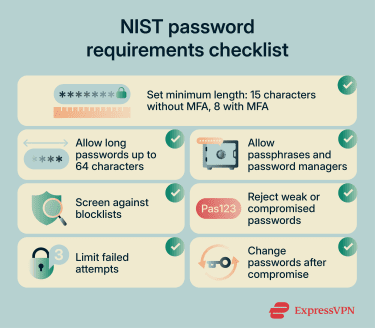
Login attempt limits and abuse prevention
NIST requires agencies to limit failed authentication attempts. This helps reduce online guessing attacks, where attackers repeatedly try passwords against a login form.
Attempt limits should protect accounts without creating unnecessary lockout problems for legitimate users. In practice, organizations can combine several controls, such as rate limiting, temporary delays, bot detection, step-up authentication, or alerts for suspicious activity.
NIST sets 100 consecutive failed attempts as the upper bound for a specific authenticator on a single account before the authenticator is disabled, and agencies may impose lower limits.
Secure password storage and hashing
NIST says organizations must store passwords in a form that resists offline attacks. That means passwords should never be stored in plain text. They must be salted and hashed using a suitable password hashing scheme. A salt is a random value added to a password before hashing, so identical passwords don’t produce identical hashes.
A password hashing scheme uses the password, a salt, and a cost factor to create a password hash. The goal is to make each password guess pricier for an attacker who obtains a hashed password file. NIST says the cost factor should be as high as practical without hurting system performance, and organizations should increase it over time as computing power improves.
For stronger protection, NIST also recommends an additional keyed hashing or encryption step using a secret key stored separately from the password hashes, ideally in hardware-protected storage such as a Hardware Security Module (HSM), Trusted Platform Module (TPM), or trusted execution environment. This makes offline brute-force attacks much harder as long as the secret key stays protected.
How to implement NIST password guidelines
Implementing NIST password guidelines requires organizations to update the full password lifecycle, including password creation, storage, login protection, recovery, employee training, and policy reviews.
A practical implementation plan should include:
- Create a NIST-aligned password policy: Replace outdated complexity rules with clearer requirements based on length, usability, password screening, MFA, and secure storage. The policy should explain which rules apply to different account types, including standard users, administrators, contractors, and service accounts.
- Use password management tools: Encourage or provide password managers so users can create and store long, unique passwords or passkeys without memorizing each one. Login forms should support autofill and pasting so password managers work properly.
- Implement password blocklisting: Screen new and changed passwords against blocklists of commonly used, expected, and compromised passwords. Include breach data, predictable patterns, company-specific terms, product names, and other context-based words attackers may try.
- Update password reset workflows: Move away from routine password expiration and only trigger password changes when there is evidence of compromise. Recovery flows should avoid weak security questions and use safer methods, such as verified recovery channels, backup codes, MFA, or identity proofing, where appropriate.
- Train employees on password security: Teach employees why the organization is changing its password rules, especially if they’re used to frequent resets or complex character requirements. Training should cover password managers, phishing risks, MFA, credential reuse, and what to do if they suspect a password has been exposed.
- Protect high-risk accounts first: Prioritize administrators, executives, finance teams, HR teams, developer accounts, and cloud management tools. These accounts can cause more damage if attackers compromise them, so they usually need stronger MFA, stricter monitoring, and faster response workflows.
- Review authentication logs and alerts: Monitor failed login attempts, unusual locations, repeated lockouts, password spraying, and credential stuffing patterns. A password policy works best when paired with active detection and response.
- Document policy exceptions: Some legacy systems may not support long passwords, MFA, paste, or modern reset flows. Document these gaps, apply compensating controls where possible, and create a plan to retire or upgrade systems that cannot meet current expectations.
- Review the policy regularly: NIST guidance, attacker behavior, and business systems can change. Organizations should review password policies at least once a year, after major security incidents, and whenever they adopt new authentication tools.
Password security best practices
NIST password guidelines give organizations a strong foundation, but password security also depends on how well those rules work. A good password policy should reduce common attack risks, help users make safer choices, and leave room for regular review as threats and systems change.
Protect against credential stuffing
Credential stuffing happens when attackers use stolen usernames and passwords from one breach to try to access accounts on another service. This attack often works because many people reuse passwords across multiple accounts.
Password managers such as ExpressKeys help users avoid reuse. When each account has a unique password, one exposed credential can’t unlock other systems.
Avoid common password myths
Many older password habits still appear in company policies, even though they don’t always improve security. For example, requiring users to change passwords every 60 or 90 days may sound safer, but it can lead people to make small, predictable changes.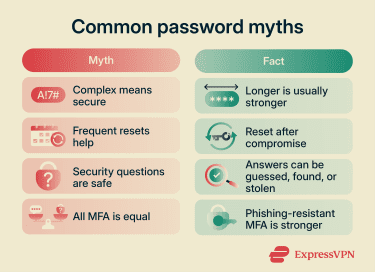
Strict complexity rules can create the same problem. A password with one uppercase letter, one number, and one symbol isn’t automatically strong if it follows a common pattern.
Organizations should also avoid assuming that security questions provide strong protection. Many people can guess, research, or expose answers through other breaches. Safer recovery methods give users a better way back into their accounts without relying on personal facts that may not stay private.
Balance security with user convenience
Good password security should make safe behavior easier, not harder. When policies create too much friction, users often find shortcuts. They may reuse passwords, write them down, make predictable changes, or avoid security tools entirely.
A NIST-aligned approach should support long passwords, passphrases, password managers, autofill, and pasting into password fields. These choices help users create stronger passwords without making the login process painful.
Organizations should also provide clear error messages when rejecting a password. Instead of vague warnings like “password does not meet requirements,” explain the issue, such as “This password appears in lists of commonly used or exposed passwords. Choose a longer, more unique password."
FAQ
Where can I read the official NIST password guidance?
Are NIST password guidelines mandatory for every organization?
Private companies aren't automatically required to follow NIST password guidance. However, many adopt it as a trusted baseline because it supports stronger, more usable authentication policies.
How long should a password be under NIST guidance?
Can users paste passwords into login forms?
Do password managers help with NIST compliance?
How should organizations handle compromised passwords?
Is SMS-based MFA still acceptable?
How often should companies review their password policy?