Cybersecurity guide for expats: Everything you need to know before settling abroad

Most of us develop cybersecurity habits that fit the country we live in. The online services we use, the scams we're used to seeing, and the laws and regulations we’re familiar with all shape how we protect ourselves online.
But when you move abroad, some of those habits no longer work as effectively. You may encounter different scams, lose access to services you rely on, or find that security measures you took for granted no longer apply. If you’re not prepared, you might not realize there’s a problem until you’re locked out of your accounts or fall for a scam.
Who’s considered an expat?
According to the United Nations Department of Economic and Social Affairs (UN DESA), around 304 million people are international migrants, which counts anyone living outside the country where they were born.
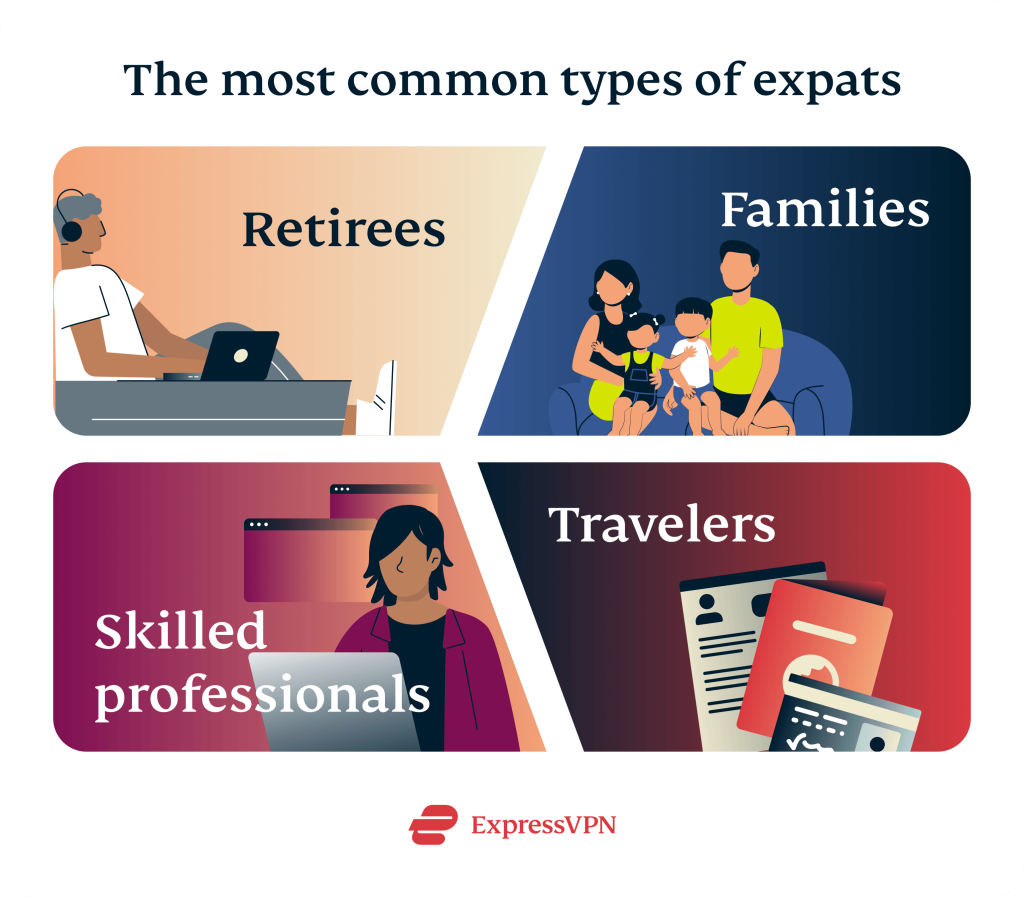
The number of expats is harder to estimate because “expat” isn’t an official demographic category. While there’s no universal definition, the term usually refers to professionals, entrepreneurs, retirees, and families who chose to live abroad for an extended period.
In any case, living across borders is quite common, so the digital risks that come with it are shared by millions.
If you’re a professional moving abroad for a job, you might suddenly find yourself juggling several banking accounts and payroll systems across your home country and your new one. Travelers and remote workers likewise face the challenge of finding and choosing trustworthy networks while they’re exploring different regions.
Families relocating have to carefully monitor their children’s devices and online activity, especially during the initial stages, where everything is still new and unsettled. Retirees face the additional challenge of accessing home country pensions, government portals, healthcare logins, and more while settling into their new home.
Given the number of things that need to be set up and managed, expats are often prime targets for sophisticated scams. That’s why it’s important to adapt your digital security setup to your new environment.
Cybersecurity essentials for anyone traveling abroad
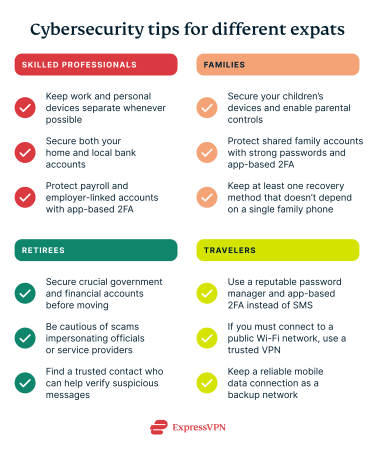
No matter where you are, the fundamentals of cybersecurity remain the same. You must still follow basic measures to protect your accounts, devices, networks, and data.
While the tips above apply to all international travelers, people relocating face additional challenges. Your existing setup doesn’t automatically move with you or adapt to your new environment. As a result, expats need more than the standard cybersecurity checklist.
Moving abroad changes three key parts of your online security: your identity anchors, your jurisdiction, and your protection against scams. The rest of this guide focuses on how to prepare for these changes.
Shift #1: You change most of your identity anchors
Most online platforms use your mobile phone number to verify your identity. It receives two-factor authentication (2FA) codes, confirms password resets, verifies suspicious banking activity, and is one of the most common account recovery methods.
But relocating often means getting a new SIM card, switching carriers, and eventually giving up your old number. Suddenly, the identity anchor that many of your accounts depend on is no longer available. If you don’t update your records before your old number becomes inactive, you risk getting locked out of your accounts.
Online communities for expats have documented cases of individuals getting locked out of their banks and email accounts because SMS verification stopped working.
There's also the risk of someone hijacking your number. In a SIM swap attack, an attacker convinces or tricks your carrier to transfer your phone number to a SIM card they control. Once that happens, verification codes and password reset messages intended for you are delivered to them instead, allowing the attacker to bypass SMS-based security and potentially take over your accounts.
What to set up before you lose that number
Before even hopping onto a plane, make sure all your account information is up to date. Ideally, you’ll already have the mobile number you’ll primarily use in your new country. At the very least, research local carriers ahead of time so you can get set up quickly when you arrive.
Wherever possible, replace SMS verification with authenticator apps or passkeys. Unlike SMS codes, these verification methods aren’t tied to a specific SIM card, so they continue working even if you change carriers or countries.
Even after switching to app-based authentication or passkeys, keep your SIM active for a few weeks, if possible. Some services take longer to update, so verification texts may still be sent to your old number. Ask your carrier about cheap roaming options so you can continue receiving codes during the transition.
Many platforms offer multiple recovery methods, so review your accounts and enable backup options wherever possible. This is especially important for your primary email account, password manager, and banking services.
If you have recovery codes, store copies in secure offline locations, such as a printed copy kept in a safe or an encrypted external hard drive. Having these backup options prevents you from getting locked out of accounts in case your SIM or app authentications fail.
Lastly, check whether your mobile carrier offers protections against SIM swapping. Many may let you add an account PIN, port-out PIN, or port freeze, making it much harder for someone else to move your number without approval.
Shift #2: You move into a new jurisdiction
Many websites and apps use your location as one of several signals to detect unusual account activity. So, banking apps, government portals, and other services from your home country may ask for additional verification, or even block access, when you sign in from abroad. These measures are designed to protect your accounts, but they can be frustrating if you’re unprepared.
Before relocating, contact your bank to let them know you’ll be living abroad. They might have procedures for customers who travel or relocate internationally and can explain what to expect when signing into your accounts from another country.
Why there’s less privacy than you may assume
Beyond the inconvenience, moving abroad also means adapting to a different legal and regulatory framework. The privacy protections and security standards you’re used to at home may not apply in the same way once you settle elsewhere.
For example, privacy laws like the European Union’s General Data Protection Regulation (GDPR) don’t automatically follow you wherever you go. Which laws apply depends on where the service operates and how it handles your data.
In any case, don’t assume that your home country’s privacy protections automatically apply in your new country.
Shift #3: You become a target for newcomer scams
The first few weeks after moving abroad are often the busiest. You’re registering for local services, trying to understand unfamiliar systems, getting settled into your new home, and learning your way around. During that period of adjustment, scammers may take advantage of any confusion or uncertainty.
Common scams that target expats
Scams that target newcomers often don’t use sophisticated hacking techniques. Instead, they exploit the confusion that can come from being new to a country.
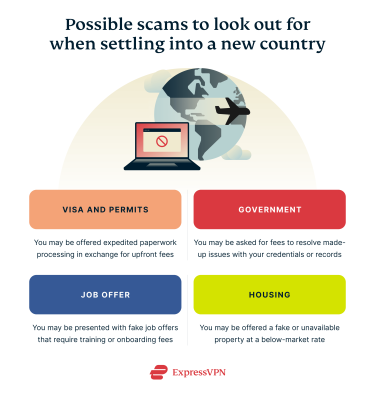
Fraudulent visa and work permit services are one example. Scammers advertise themselves as consultants who can speed up paperwork or guarantee approvals in exchange for upfront fees. Others pose as recruiters with convincing job offers that require payment for processing, training, or background checks before employment begins.
Housing scams are also common. A property may be advertised well below the local market rate to attract interest, with the “landlord” requesting a security deposit before you’ve had the chance to view the home. Once the payment is sent, the listing disappears, or you discover the property was never available to rent in the first place.
Expats relocated for work may be particularly vulnerable, since they’re often on a tight timeline to settle in before starting a new job. The pressure to get everything in place quickly can make suspicious offers seem more tempting than they otherwise would.
Bad actors may also call or email while posing as government officials. They may claim there’s a problem with your visa, residency status, or tax records and pressure you to pay immediately or provide sensitive personal information to avoid penalties.
These scams are effective because they take advantage of your limited familiarity with local systems and processes. It can be difficult to tell what a legitimate message or request should look like. Scammers may also use personal information obtained from public sources or previous data breaches to make their messages appear even more convincing.
How to spot and slow down a scam
During the first few weeks and months after you move, you’re likely opening new accounts, making large money transfers, handling sensitive documents (both digital and physical), and receiving a flood of messages. At the same time, you’re navigating unfamiliar systems and adjusting to a new environment.
All of this creates the perfect conditions for social engineering. It becomes much harder to distinguish legitimate requests and offers from fraudulent ones when you’re processing so much new information.
The simplest and safest response is to slow down. Be cautious of unexpected messages that create a sense of urgency, especially if they involve money or sensitive information.
Before paying a deposit, application fee, or service charge, verify the individual or organization through an official source. If someone claims to represent a government agency, bank, or other institution, use the organization’s published contact details to confirm the request.
Enable transaction alerts on your banking accounts so you can spot unauthorized activity as soon as possible. For large transactions, such as housing deposits, consider using a separate account to limit the impact if your primary account is compromised.
Remember: taking a few extra minutes to verify details can save you a great deal of stress, money, and time.
Settle into your new life without risking your digital safety
The fundamentals of cybersecurity don’t change when you move abroad. What does change are the systems those protections rely on. Your phone number, your location, and your familiarity with local institutions may no longer work the way they did at home.
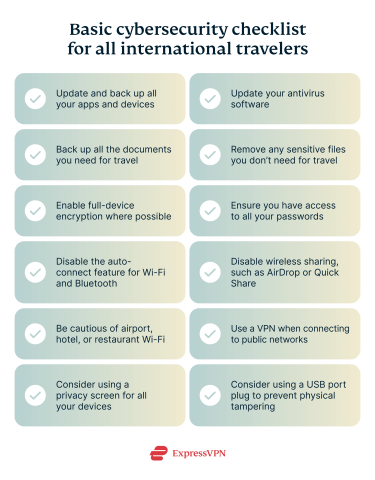
The checklist below summarizes the most important actions to take before and during your move.
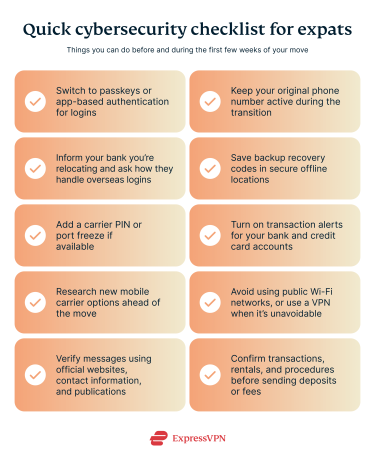
Most of the risks can be managed with a little preparation before you leave and a few key adjustments once you arrive. Update your recovery methods, protect your most important accounts, and take a moment to verify unexpected requests, especially those involving money or sensitive information.
Moving abroad doesn’t have to mean compromising your digital security. With the right habits in place, you can focus on settling into your new life while keeping your accounts, data, and identity protected. Just remember that no set of habits guarantees complete protection; the goal is to stay vigilant and keep adapting as your situation changes.
FAQ
Do I still need a VPN if I live abroad rather than just travel?
Yes. A VPN can add privacy when you’re using local or public networks you don’t fully trust. While it’s not a replacement for good cybersecurity practices, it adds an important layer of protection, especially on public Wi-Fi.
Why did my home bank lock me out after I moved?
Banks may flag logins from a new country as suspicious and require additional verification. If you’re no longer receiving SMS codes on your original phone number, contact your bank directly to explain the situation and request assistance.
Is public Wi-Fi really that risky when I use it every day?
Yes. Public Wi-Fi carries additional risk because you don’t control how the network is secured. Avoid using it for sensitive activities whenever possible. If you must, use a reputable VPN to encrypt your connection and help protect your data.
How do I keep getting my two-factor codes after I change my SIM?
Move your accounts from SMS to an authenticator app before giving up your old number. Keep your home SIM active until you’ve updated your important accounts. You should also save backup recovery codes and enable passkeys wherever possible.
What are the most common scams aimed at expats, and how do I check if a message is real?
Common scams targeting expats include fake visa services, rental fraud, bogus job offers, and callers pretending to be government officials. Be cautious of messages that create a sense of urgency, especially when they involve money or sensitive information. Verify the request using official websites and contact details, or ask a trusted local if you’re unsure