Is airplane Wi-Fi safe? How to browse more securely


Airplane Wi-Fi is generally safe for ordinary browsing, but it carries some of the same risks as other public Wi-Fi networks. When you connect, your device is using a network shared by other passengers, and the airline and its Wi-Fi provider may see which sites your device connects to.
Connecting to ExpressVPN makes your in-flight browsing safer, as it encrypts the internet traffic between your device and the VPN server. This means other passengers, the airline, and the Wi-Fi provider can’t see what you do online, but note that ExpressVPN doesn’t protect you from malware, phishing, or joining a fake hotspot by mistake.
How ExpressVPN protects you on in-flight Wi-Fi
Most websites already use HTTPS to encrypt the data sent between your browser and the website, protecting sensitive information such as passwords and payment details. ExpressVPN also covers what HTTPS leaves visible on the plane’s network, including the names of the sites your device looks up (Domain Name System, or DNS, requests) and your connection metadata.
ExpressVPN adds an extra layer of protection by encrypting the traffic between your device and the VPN server, using its own private DNS servers inside the encrypted tunnel.
With the VPN active, the airline company, in-flight Wi-Fi provider, and other passengers can see your device is sending data to that server, but they can’t read the data or see which sites you visit. It also helps protect traffic coming from apps that don’t encrypt their connections.
Below are some common in-flight Wi-Fi threats and how ExpressVPN helps to address them.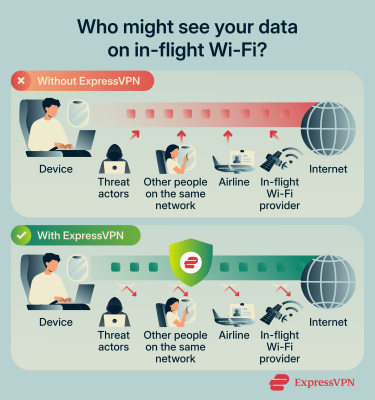
Man-in-the-middle (MITM) attacks
In an MITM attack, someone secretly places themselves between your device and the Wi-Fi network, allowing them to intercept the data you send and receive. With in-flight Wi-Fi, attackers may have more opportunities to attempt this type of attack because they can redirect your traffic on the shared network or set up their own fake hotspots.
With ExpressVPN’s encryption, attackers won’t be able to make sense of your data, even if they successfully intercept it.
Unencrypted plane-to-ground satellite connections
Not all parts of an in-flight internet connection are protected in the same way. A 2025 study by researchers at the University of California, San Diego, and the University of Maryland found that some satellite links carrying in-flight internet traffic weren’t encrypted, so someone on the ground with satellite receiving equipment could capture the traffic passing over them, as the researchers did.
Most of the passenger web traffic the researchers saw was still protected by HTTPS or other encryption on the passengers’ devices. DNS requests, which reveal which websites a device is trying to reach, were visible.
ExpressVPN encrypts your DNS requests and the rest of your traffic before it reaches the airplane’s network, so anyone capturing the satellite link sees encrypted data going to an ExpressVPN server, helping to protect your data as it travels across the network.
Privacy risks
Airlines and in-flight Wi-Fi providers may collect information about passengers who use their Wi-Fi. For example, Air Canada’s privacy notice for its onboard Wi-Fi states passengers must consent to the collection of their personal information for targeted advertising and customer insights.
ExpressVPN’s encryption protects your privacy by preventing the airline and Wi-Fi provider from seeing which websites you visit. Keep in mind, though, ExpressVPN doesn’t change what you share when you sign in to the Wi-Fi, such as your name, email address, or loyalty number.
How to use ExpressVPN on airplane Wi-Fi
Using ExpressVPN on airplane Wi-Fi is easy. You just need an ExpressVPN subscription and the app installed on the device you’ll use during the flight. The steps below use the Windows app, but our Android and iOS apps follow the same order.
1. Install ExpressVPN before travelling
We recommend installing and signing in to the ExpressVPN app on your device before your flight, so it’s ready to use when you connect to the airplane Wi-Fi.
ExpressVPN works on a wide range of devices, including Windows, macOS, Android, and iOS, and it’s quick to set up. For full download and installation instructions, see our guide: How to download and install ExpressVPN.
2. Connect to the airplane’s Wi-Fi
The exact steps may vary depending on your airline and Wi-Fi provider. You’ll typically need to complete the connection through a captive portal, a webpage that may ask you to accept terms, sign in, or purchase Wi-Fi access if you haven’t already. Complete this step before connecting to ExpressVPN, because the portal needs to reach your device directly to grant it internet access. If you need assistance with this step, ask a member of the cabin crew.
3. Connect to a VPN server
After you’ve connected to the airplane’s Wi-Fi, open the ExpressVPN app and click or tap the power button. This will automatically connect you to a recommended server location. Here’s how it looks on the Windows app.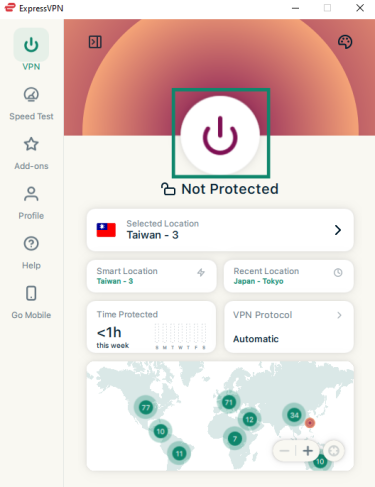
Once you’re connected to the VPN server, the text under the power button will change to “Protected.”
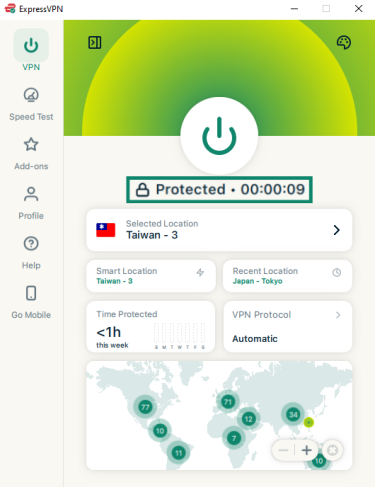
To check the connection, open ExpressVPN’s IP address checker. It should show an ExpressVPN server’s IP address and location rather than the in-flight Wi-Fi provider’s. The DNS leak test shows whether your DNS requests are going through ExpressVPN.
If you’d like to choose a different server from the one ExpressVPN recommends, click the arrow next to Selected Location. This will bring up a list of available servers, where you can pick from the Recommended tab or browse All Locations. Click or tap the one you'd like to connect to.
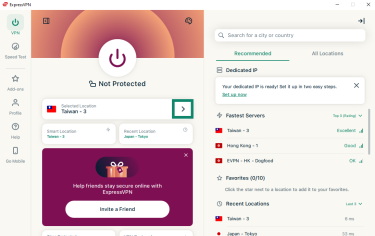
For faster speeds, it’s generally best to choose a location that’s closer to you, because your traffic travels a shorter distance to the VPN server. On airplane Wi-Fi, the satellite connection already adds delay, so a distant location adds more delays on top of it.
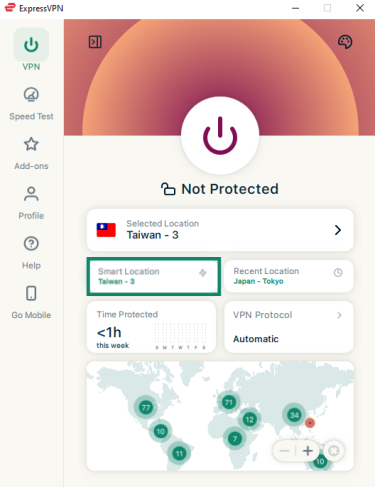
If you’re not sure which available location is fastest, we recommend using the Smart Location feature. Clicking or tapping on it will connect you to the VPN server location that will provide the optimal experience for your current network conditions and location.
4. Check your Internet Kill Switch settings
ExpressVPN has a feature called Internet Kill Switch that blocks internet traffic if your connection to the VPN server drops. This stops your device from sending unencrypted data over the plane’s network while ExpressVPN reconnects, and it’s particularly important for airplane Wi-Fi because in-flight connections can be unstable. The Internet Kill Switch is enabled by default on desktop and mobile, but it’s a good idea to confirm it’s on before you start browsing.
To do that on the Windows app:
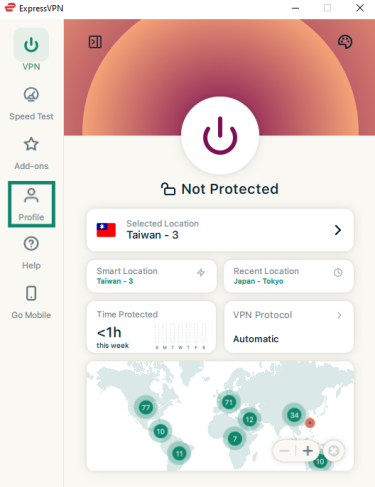
- In the ExpressVPN app, click Profile on the sidebar.
- Under Settings, click Internet Kill Switch.
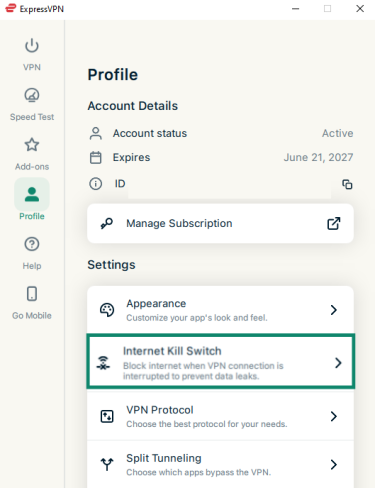
- Check that Enable when connected is toggled on. Avoid turning on Enable at all times, as this may prevent the airline Wi-Fi’s sign-in page (captive portal) from loading.
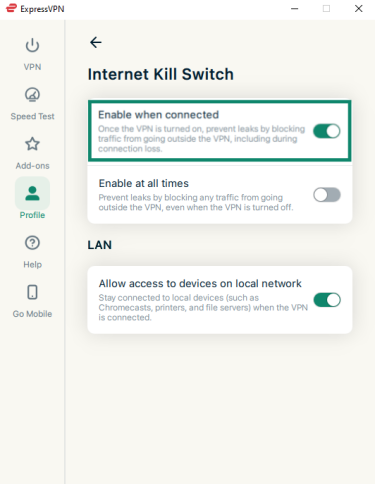
- (Optional) Turn off Allow access to devices on local network. With this setting off, your device won’t communicate with other devices on the plane’s Wi-Fi, such as other passengers’ laptops and phones, while ExpressVPN is connected.
For more information about the Internet Kill Switch on desktop, see the support guide: How to use the Internet Kill Switch on the ExpressVPN desktop apps.
For information about the Internet Kill Switch on mobile, see the Android and iOS guides.
5. Turn on Advanced Protection
When connecting to airplane Wi-Fi, you may need to navigate unfamiliar networks and pages, which can make it harder to tell whether something is legitimate. And if you accidentally connect to a rogue network or land on a fake captive portal, the threat actor may direct you to a malicious site designed to steal your data or infect your device with malware.
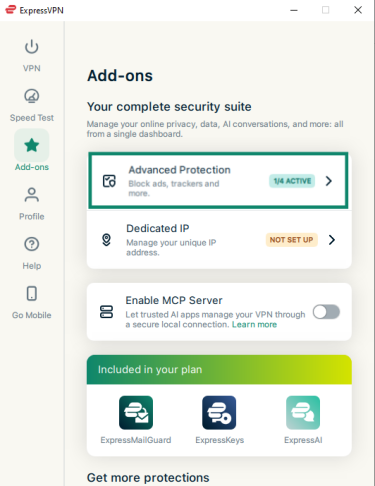
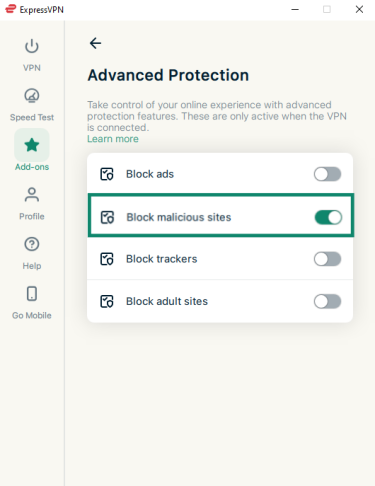
ExpressVPN offers a feature called Advanced Protection that can help reduce these risks. It includes a Block malicious sites setting that stops your device from loading sites whose domains are on known malware and phishing blocklists, including links you open from an email or an ad during the flight.
This feature isn’t enabled by default, so you’ll have to turn it on yourself. Here’s how to do it on the Windows app:
- In the ExpressVPN app, click Add-ons on the sidebar.
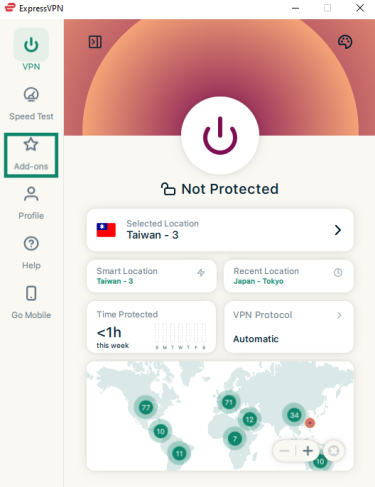
- Click Advanced Protection.
- Enable Block malicious sites.
For more information about Advanced Protection and how to enable the feature on mobile, see the support guide: What is advanced protection?
What ExpressVPN can’t protect you from on airplane Wi-Fi
There are some airplane Wi-Fi risks that ExpressVPN can’t protect you from. For example, using a VPN won’t stop you from accidentally connecting to a rogue Wi-Fi hotspot (though it can help to prevent the hotspot operator from reading your traffic if that does occur).
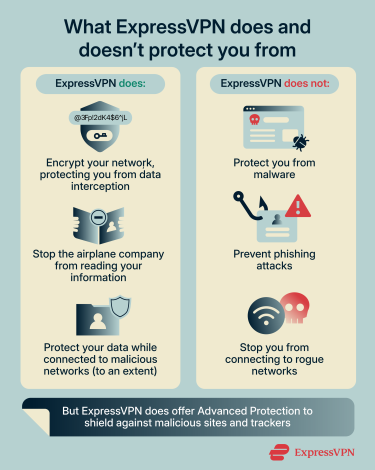
A VPN also doesn't stop you from downloading malware or falling for a phishing scam, so you should still be careful about the sites you visit and the files you download. ExpressVPN’s Advanced Protection includes a setting that uses blocklists to help block known malicious websites and other harmful domains, but it isn't guaranteed to block every malicious site.
What can the in-flight Wi-Fi provider still see?
Connecting to ExpressVPN doesn’t make you invisible to the in-flight Wi-Fi provider. ExpressVPN prevents the provider from seeing which websites you visit, but they’ll still be able to see that your device is connected to the network and that you’re using a VPN, as well as some metadata, such as connection times, data volumes, and bandwidth usage.
Why trust ExpressVPN for in-flight Wi-Fi?
When you use a VPN, your internet traffic passes through the VPN provider’s servers, so it’s important to choose a provider you can trust. Otherwise, you may simply be handing your data to a different entity.
ExpressVPN provides tangible safeguards for your privacy, such as:
- TrustedServer technology: Our VPN servers run entirely on RAM, so your data isn’t collected or stored permanently on the servers where it could potentially be accessed later by threat actors. Everything on a server is wiped each time it restarts, and every server runs the same up-to-date software.
- A strict no-logs policy: We don't collect information about the websites you visit, the files you download, or the apps you use, so we can't share that activity with anyone, whether they're advertisers or law enforcement.
- Regular independent audits: Our apps, servers, and privacy policy regularly undergo inspections by independent cybersecurity experts, and we publish their findings for everyone to see.
Want more privacy when you connect to airplane Wi-Fi?
ExpressVPN encrypts your internet traffic, helping keep your browsing activity private from airlines, in-flight Wi-Fi providers, and others on the network.
Protect your in-flight browsing with ExpressVPN
Try ExpressVPN with a 30-day money-back guarantee for new users.
FAQ
Will ExpressVPN work on airplane Wi-Fi?
ExpressVPN usually works on airplane Wi-Fi. Just make sure you connect to the Wi-Fi through the captive portal before connecting to a VPN server, as your device’s IP address typically has to match the Wi-Fi network’s IP address for the login portal to work correctly. Just make sure to turn your VPN on again first before doing anything else online.
What happens if ExpressVPN disconnects during a flight?
Assuming you enabled the Internet Kill Switch, ExpressVPN will block your device’s internet traffic until the VPN connection is restored. This prevents your data from being sent over the airplane Wi-Fi without VPN protection. Once ExpressVPN reconnects, your internet access should be restored.
Can I use ExpressVPN on Wi-Fi if the plane’s connection is slow?
Yes, you can use ExpressVPN on a slow airplane Wi-Fi connection, but encryption and the extra distance to the VPN server add some delay, so pages may load more slowly. With high-speed servers in 113 countries, you can connect to a location near you or use Smart Location (Fastest Location on mobile) to choose one automatically. The airplane’s Wi-Fi sets the upper limit on your speed.
Can I connect to ExpressVPN before joining the airplane’s Wi-Fi?
It’s best to connect to the airplane’s Wi-Fi and complete the captive portal before connecting to ExpressVPN. The captive portal needs to authenticate your device and grant it internet access, and connecting to a VPN first can prevent the portal from functioning correctly.
Is airplane Wi-Fi monitored?
Yes, airplane Wi-Fi is typically monitored for security and legal compliance. Airlines and their internet providers may track browsing activity, app usage, and data volume. Some airlines and Wi-Fi providers may also use information collected through their services for advertising purposes. If you don’t want the airline or in-flight Wi-Fi provider to see your browsing activity, use ExpressVPN to encrypt your traffic.