Expressvpn Glossary
Network automation

What is network automation?
Network automation is the use of software to manage, configure, and operate network infrastructure. It relies on controllers, scripts, and APIs to consistently apply predefined configurations across a network, rather than manually accessing routers, switches, and firewalls individually. This approach helps organizations scale their networks more efficiently while reducing configuration errors and operational overhead.
How does network automation work?
Network automation typically begins by defining a desired state using configuration files or templates. The desired state consists of standardized settings, such as access control lists, routing policies, virtual local area network (VLAN) configurations, and security parameters that are applied consistently across network devices.
Automation tools then distribute these settings across network equipment, typically through APIs or Secure Shell (SSH) connections.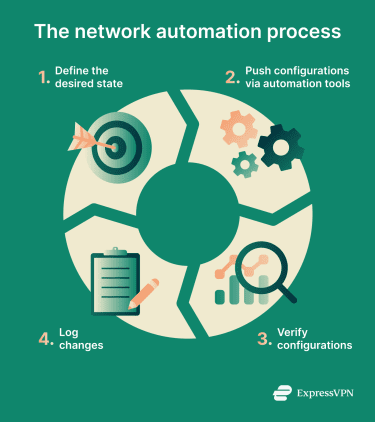
After updates are applied, automation systems can then verify that devices are configured correctly, that services respond as expected, and that security policies are properly enforced. If the actual state differs from the desired state (configuration drift), the system can detect the discrepancy and automatically restore the correct settings.
All configuration changes are logged to create audit trails documenting what changed, when it changed, and who initiated the change.
Types of network automation
Network automation exists at different levels of complexity and scope:
- Device-level scripting: Uses simple scripts to handle individual tasks on a single device, such as backing up router configurations or updating interface settings.
- Configuration management at scale: Centralized tools manage and enforce consistent configurations across many devices, making it easier to apply standards and roll back updates. This approach helps keep firewall rules, authorization policies, and security baselines uniform across the entire infrastructure.
- Orchestration across services and domains: Network automation can coordinate multiple automated tasks across networks, applications, and security systems so changes occur in the correct order.
- Intent-based, policy-driven automation: Teams define high-level policies or desired outcomes, and the automation system determines how to implement them across the network. These policies are translated into specific device configurations.
- Closed-loop automation with feedback: Automation systems monitor network behavior and use feedback to adjust configurations or correct issues automatically.
Why is network automation important?
One major benefit of automation is that it reduces misconfigurations caused by manual configuration, which can expose systems or cause outages. It also makes it easier to enforce internal standards and meet compliance requirements.
Network automation can also support faster security and operational responses. Changes such as patching devices, tightening user restrictions, or updating routing policies can be rolled out across the network much faster.
Where network automation is used
Network automation is used across various network environments and industries, including:
- Enterprise campus and branch networks: In enterprise campus environments, network automation helps manage configurations across large, interconnected sites such as headquarters, campuses, and remote branches.
- Data centers and cloud networking: Many organizations use automated workflows to provision virtual networks, update configurations, and synchronize configurations as workloads scale up or down.
- Internet service providers (ISPs) and large service provider backbones: With automation, providers can manage complex, high-volume networks while rolling out changes with minimal disruption.
- Zero trust architectures and secure access infrastructure: Network automation enforces granular access controls across both internal segments and remote access gateways. It dynamically updates segmentation policies, user permissions, and gateway configurations as users, devices, workloads, and threat conditions change.
Risks and privacy concerns
While network automation improves efficiency, it can also amplify mistakes if not properly governed. Because automation operates at scale, weak credential management, overly broad permissions, or poorly tested templates can rapidly propagate insecure configurations across many devices.
Similarly, exposed API access or insufficient logging can allow unauthorized changes to spread quickly and make investigations harder.
Further reading
- What is network mapping? Complete guide
- What is network discovery? How to enable it safely
- How to use Ansible Variables and Vaults
- Network architecture: Building secure and modern networks