What is a proxy server?



Proxy servers are widely used networking tools that sit between a client, such as your browser, and a destination server, such as a website. With a proxy server in your traffic path, your data doesn't travel directly to its destination: instead, it takes an extra hop through the proxy first, which then forwards it on your behalf.
This makes proxy servers a popular option for privacy, access control, and traffic management. In this guide, we explain how they work, the types of proxy servers that exist, and what to expect when using one.
How does a proxy server work?
A proxy server acts as an intermediary that forwards requests from clients and returns responses from destination servers. Exactly where it sits in your traffic path and how it behaves depends on how it’s configured.
For example, a proxy server could sit between your device and a website, your entire network and the internet, or just a specific app and its backend servers. It also might enforce access restrictions, cache content, or simply act as a pass-through.
Regardless, all proxy servers follow the same steps when handling traffic. Here’s how it works in practice.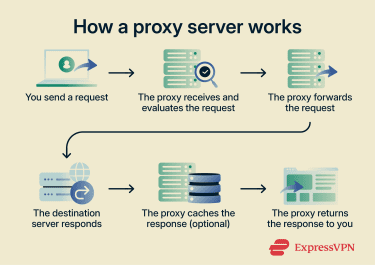
Step-by-step overview
- You send a request: You enter a website address, and your browser sends the request to the proxy server.
- The proxy receives and evaluates the request: The proxy server inspects the request based on its rules. It may allow, block, log, or inspect the traffic.
- Address handling (optional): Depending on its configuration, the proxy server may modify HTTP headers and use information about your IP address in request headers.
- The proxy forwards the request: The proxy server sends your request to the target website and receives the response.
- The destination server responds: The target server receives the request from the proxy's IP address, processes it, and sends the response back to the proxy.
- The proxy caches the response (optional): If enabled, the proxy server may store a copy of the response to serve similar future requests more quickly.
- The proxy returns the response: The proxy server relays the response back to your browser, which then loads the website.
Real-life use case example
Here are some common applications for proxy servers:
- Individual users: Some internet users rely on proxy servers to access websites through a different virtual location.
- Workplace networks: Many businesses use proxy servers to enforce security policies and block access to malicious websites.
- Hotels: Some hospitality networks use proxy servers to manage internet traffic and enforce usage policies for guests.
- Schools: Educational institutions often use proxy servers to prevent access to distracting or inappropriate websites.
Types of proxy servers
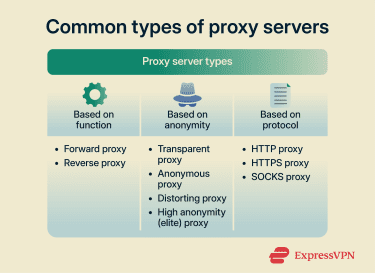
Proxy servers come in several varieties, each designed for a different purpose. They can be categorized by:
Each category includes different subtypes suited for specific routing, security, or content access tasks.
Based on function
The function of a proxy server is determined by which side of the connection it serves: the client or the server.
Forward proxy
A forward proxy server is what most people think of when they hear the term “proxy.” It sits in front of one or more clients and handles outbound requests on their behalf. When you configure a proxy on your device, browser, or OS, you are setting up a forward proxy. The destination server only sees the proxy's IP address, not yours.
Depending on its configuration, a forward proxy server may cache content, block unapproved destinations, mask user IP addresses, or manage traffic to improve network performance.
Reverse proxy
A reverse proxy server sits in front of one or more destination servers and directs requests from external clients to the appropriate backend application. The clients communicate only with the reverse proxy server.
Depending on the setup, this can obscure the IP addresses of backend servers from external clients, which helps mitigate distributed denial-of-service (DDoS) attacks because external traffic targets the proxy server rather than the organization’s internal infrastructure. That said, in many configurations, the proxy and backend run on the same machine where they:
- Cache content and deliver it to clients directly, reducing the need to forward requests to backend servers and lowering latency.
- Distribute client requests across multiple server instances using load balancing, helping backend applications handle large volumes of traffic.
- Handle Transport Layer Security (TLS) encryption and decryption, offloading this task from backend servers to improve performance.
Based on anonymity (privacy)
No proxy can provide complete anonymity online. When you see “anonymity” in the context of proxies, it’s generally referring to how much identifying information they expose or conceal from the destination server.
Proxy servers can include two key pieces of information in the request headers they forward: your real IP address, typically via the X-Forwarded-For header, and an indicator that a proxy is being used, via the Via header. The different privacy levels are defined by which of these headers they include, omit, or manipulate.
Transparent proxy
A transparent proxy server offers no anonymity. It shows your real IP address in the X-Forwarded-For header and identifies itself as a proxy in the Via header to the destination server. Organizations typically use transparent proxies to monitor traffic, restrict access to unapproved sites, redirect users to authentication pages, and cache requested content to reduce bandwidth usage.
Anonymous proxy
An anonymous proxy hides the client IP address when forwarding requests to destination servers. It can do this in several ways depending on the configuration:
- Omitting the X-Forwarded-For header: No IP address is passed along. This is the most common configuration and is typically what people mean when they refer to an anonymous proxy.
- Substituting the client's IP: The proxy includes its own IP address in the X-Forwarded-For header. This way, the destination server knows a proxy is being used but can’t see who is behind it.
- Using a fabricated IP address in the X-Forwarded-For header: The request appears to originate from a different user or location. This is specifically known as a distorting proxy.
Anonymous proxies may or may not include a Via header in forwarded requests to indicate that a proxy is involved. A proxy that omits the Via header entirely is called a high-anonymity (elite) proxy, and it makes it appear as if the request is coming from a regular client. This is the highest level of privacy a proxy can provide.
Based on protocol
Proxy servers can use different network protocols to manage how traffic is exchanged between clients and destination servers. The protocol a proxy supports determines what kind of traffic it can handle and how much it can see. Depending on the protocol they use, proxy servers can fall into the following categories:
HTTP proxy
This type of proxy server uses the HTTP protocol to handle web requests between a client, such as a web browser, and a destination server, like a website. Many HTTP proxy servers listen on Transmission Control Protocol (TCP) port 80, the default port for HTTP traffic, though they can be configured to operate on other ports.
HTTP proxy servers are often used for data scraping, content filtering, and limiting some forms of IP-based tracking. When forwarding requests, they can be configured to communicate with websites using their own IP addresses.
HTTPS proxy
HTTPS proxy servers forward encrypted web traffic between clients and destination servers. When you use an HTTPS proxy server for browsing, you’re often using an HTTP proxy server configured to support the CONNECT request method, which allows it to tunnel HTTPS traffic.
In this case, the proxy server acts as a TCP relay that forwards encrypted HTTPS traffic between the client and destination server. It typically can’t inspect, filter, or cache the encrypted content, though it can still see connection details such as the destination IP address. Whether the HTTPS proxy server stores this information depends on its logging policy.
Additionally, an HTTPS proxy server can be configured to use TLS encryption to protect the connection between the client and the proxy server. This method is often used when the proxy server requires authentication, as TLS helps protect login credentials and other sensitive data from interception.
Note: Some organizations configure HTTP and HTTPS proxy servers with TLS interception. This allows encrypted traffic to be intercepted, decrypted, inspected, and then re-encrypted before being forwarded to the destination server.
SOCKS proxy
SOCKS proxy servers operate at a lower level of the Open Systems Interconnection (OSI) model than HTTP and HTTPS proxies, making them protocol-agnostic. These proxies don’t interpret the traffic they forward. They simply pass data between the client and the destination regardless of the protocol being used, making it compatible with web traffic, email, file transfers, and more.
The latest version, SOCKS5, includes support for User Datagram Protocol (UDP), allowing it to manage a wider range of connections. Common use cases include web browsing, file sharing, remote access, and online gaming.
Note: While SOCKS5 proxies support authentication, the protocol itself doesn’t provide encryption. To protect transmitted data, SOCKS traffic can be combined with other security protocols, such as TLS.
Benefits of using a proxy server
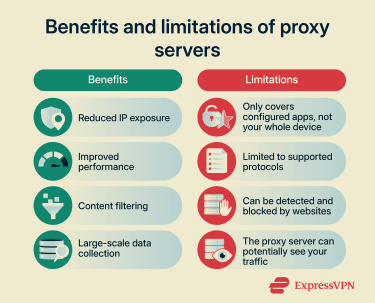
Depending on the setup, proxy servers can provide the following advantages:
- Reduced IP exposure: A proxy server can hide your IP address, limiting how much destination servers and online services can tie activity back to your device.
- Improved performance: Proxy servers can cache frequently requested content and serve it directly to users without hitting the destination server again, reducing latency and saving bandwidth.
- Content filtering: Organizations can use proxy servers to block access to malicious, inappropriate, or non-work-related websites across an entire network.
- Large-scale data collection: Businesses may use proxy server networks to distribute web scraping requests across multiple IP addresses, making large-scale data collection more reliable.
Risks and limitations of using a proxy server
While proxy servers are a useful networking tool, they come with limitations worth understanding before relying on one.
Technical limitations
A proxy server is typically configured at the browser or application level, meaning only traffic from that specific browser or app is routed through it. Traffic from other applications on your device, such as email clients, messaging apps, or system processes, bypasses the proxy entirely and travels directly to its destination, though this can also be avoided by configuring the proxy at the operating system level.
Proxy servers are also protocol-dependent. An HTTP proxy can only interpret HTTP and HTTPS traffic. SOCKS proxies are more versatile, but they’re still transport-layer proxies, meaning they can only handle protocols on or above that layer built on TCP or UDP.
Finally, some online services are able to detect proxy usage, often by checking request headers, flagging known proxy server IPs, or analyzing TLS handshake characteristics or timing patterns. If a website detects proxy server usage, it may display CAPTCHA challenges, limit functionality, or restrict access completely.
Trust and privacy risks
Because your traffic flows through the proxy, the operator has the same level of visibility into your activity as your internet service provider. They can see which sites you visit, when, and how often. Whether that data is logged, stored, or shared depends entirely on the operator's policies.
Proxy servers also don’t typically add their own layer of encryption, with the exception of the HTTPS proxy. Still, whether your traffic is protected depends on the protocol. Unencrypted HTTP traffic passing through any proxy, including an HTTPS proxy, is fully visible to the proxy operator. This makes the choice of proxy and how much you trust whoever runs it particularly important.
Finally, free and public proxy servers carry an elevated risk of being operated maliciously. A bad actor running a proxy can intercept unencrypted traffic, inject content into pages, or log credentials and session data.
Is it legal to use a proxy server?
Using a proxy server is generally legal in most jurisdictions, and it’s a common tool for privacy, web browsing, performance optimization, and content control. However, proxy server usage can become illegal when used for unlawful activities, such as fraud or copyright infringement.
That said, laws differ by country. What’s legal in one place may be restricted in another. Corporate compliance can matter, too. For example, your employer might ban external proxy use. Violating that rule could result in disciplinary action, even if the proxy itself is legal. Always check local regulations and service policies before using a proxy server.
Proxy server vs. web proxy: Is there a difference?
Despite the similar name, a web proxy is fundamentally different from a proxy server. A proxy server is a networking tool you configure at the system or browser level to route your traffic through it and forward your requests on your behalf.
A web proxy, by contrast, is a standalone website where you paste a URL into a form, and the site fetches the page for you. Web proxies were popular in the early days of the internet as a way to bypass content restrictions, but they come with serious limitations that make them a poor choice today.
Risks and limitations of web proxies
The issue with web proxies is that they don’t just relay traffic between your device and the destination website. Normally, when you access an HTTPS website directly, your browser encrypts request data using TLS so only the destination site can decrypt it. Your browser also verifies the site's identity through its digital certificate via the public key infrastructure (PKI), confirming you are actually talking to the site you think you are.
But when you access an HTTPS site through a web proxy, your browser treats the web proxy as the destination website and uses the proxy’s TLS certificate to encrypt your data. The web proxy then initiates the connection to the HTTPS site you requested and re-encrypts your data using its own TLS certificate.
This means:
- You have no end-to-end encryption with the actual site you are trying to visit.
- The web proxy can see everything, including your requests, the responses, and any data you submit, including login credentials, like your username and password, and payment details.
- Your browser can’t verify the identity of the destination site, bypassing PKI entirely.
Web proxies also struggle with modern web technologies. Because a web proxy has to rewrite all the URLs in the HyperText Markup Language (HTML) it relays back to you, dynamically generated requests from JavaScript often bypass that rewriting, causing resources to fail to load or behave unexpectedly.
Authenticated sessions also break because session cookies are tied to the destination domain, but your browser thinks it is on the proxy's domain, so cookies aren’t sent correctly. Streaming content might fail as well because web proxies are built around a simple request-response model and aren’t designed to handle persistent or chunked connections.
Proxy server vs. VPN: Which one should you use?
Both proxy servers and virtual private networks (VPNs) send your traffic through a remote server before it reaches its destination. However, VPNs generally provide more comprehensive protection than proxy servers, which we’ll discuss in detail below.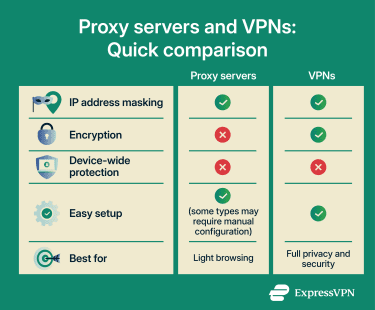
Key differences
VPNs and proxy servers primarily differ in terms of:
- Network layer: A VPN operates at the network layer, encrypting all traffic before it leaves your device. This means it doesn’t interact with application-level constructs like HTTP headers at all. A proxy server, by contrast, operates at the application layer and handles traffic at the HTTP/HTTPS level, which is why it can read, modify, and manipulate headers like X-Forwarded-For.
- IP substitution: A VPN always replaces your IP address. The destination server only ever sees the VPN server's IP. With proxy servers, it depends on the type: some proxies fully substitute your IP, while others can reveal it to the destination server.
- Security: VPN encrypts all your traffic in its own tunnel regardless of the protocol, adding a consistent layer of protection. With proxies, only an HTTPS proxy adds its own layer of encryption, and even then, only between the client and the proxy itself. Whether your traffic is protected beyond that still depends on the protocol you are using.
- Privacy level: A proxy server is typically configured at the browser or application level, meaning only traffic from that specific browser or app is routed through it. A VPN operates at the operating system level and routes all traffic from your device through the tunnel, providing more comprehensive coverage.
- Performance: Proxy servers can sometimes be faster than VPNs precisely because they do not add their own encryption overhead. VPNs encrypt and decrypt all traffic, which introduces some latency. That said, speeds for both depend on factors such as server distance, network stability, and service configuration.
When to use a VPN instead
You should generally use a VPN when you need to protect sensitive data, like when accessing accounts or making payments on unsecured public Wi-Fi. A VPN is also useful when you want to secure all of your device’s internet traffic for a higher level of online privacy. Proxy servers, on the other hand, are better suited for lighter browsing tasks where security and privacy are not primary concerns.
Some VPN providers offer access to both proxy and VPN servers, making it easy to switch between them depending on your needs. For example, ExpressVPN’s hybrid browser extension for Chrome and Firefox functions like a proxy-VPN hybrid solution. It lets you switch between Proxy Mode, which offers a browser-only protection mode that routes browser traffic through ExpressVPN servers, even if no VPN app is installed, and a remote control option that manages the desktop app to secure all device traffic.
FAQ: Common questions about proxy servers
What is a free proxy list?
Can I use a VPN and a proxy together?
Will a proxy slow down my internet?
Are proxies safe for sensitive data?
What’s the best proxy type for beginners?
How do I connect to a web proxy?
What is the difference between a proxy server and a firewall?
What does "configure proxy" mean?
Take the first step to protect yourself online. Try ExpressVPN risk-free.
Get ExpressVPN












 Support Center
  FAQ
FAQ  VPN Setup Tutorials