How often should you change your passwords?


Passwords sit at the center of almost everything we do online, yet expert advice on how often we should update them has bounced around for years. So what is “good security” when it comes to passwords?
In this article, we’ll look at the most recent recommendations from cybersecurity experts, how password guidance has evolved, and why some long-standing assumptions no longer hold up in practice.
Should you change your passwords regularly?
The short answer is no. You might have heard that it’s good practice to change your passwords every 30–90 days. However, changing your password regularly doesn’t make your account safer, and it can actually weaken your account’s security.
Why frequent password changes might not be helpful
The National Institute of Standards and Technology (NIST) and the United Kingdom National Cyber Security Centre (NCSC) stopped recommending scheduled password resets after finding that routinely forcing password changes often creates unintended security issues. Here’s why:
Frequent changes often lead to predictable updates
When passwords have to be replaced regularly, updates often take the form of small, incremental adjustments rather than completely new choices. These predictable patterns can make the new password easier for attackers to anticipate.
Constant updates can encourage less secure storage habits
Keeping track of many changing passwords can be difficult, which can lead to storing them in places that aren’t well-protected. This increases the chance that a password could be accessed by someone else.
Regular resets increase the likelihood of forgotten passwords
As the number of required changes grows, so does the chance of losing track of the most recent version. This leads to more recovery steps and interruptions without offering meaningful security benefits.
Scheduled changes don’t address password-reuse risks
Many account compromises stem from reused passwords that were exposed elsewhere. Changing a password on a timetable doesn’t prevent this.
When should you change your password immediately?
If there’s reason to believe your login details have been exposed or misused, updating the password promptly can limit further access by attackers. Below are common situations where an immediate change is recommended.
After a data breach or hack
If a service you use reports a breach that may have exposed login details, you should update your password right away. Credential reuse is one of the first things attackers exploit, and they usually act quickly after the breach becomes public.
You notice suspicious activity on your account
Unexpected login alerts, verification codes you didn’t request, password-reset emails, or new devices appearing in your account history all indicate that someone may be attempting to gain access. Changing your password limits further attempts and helps secure any sessions that might already be active.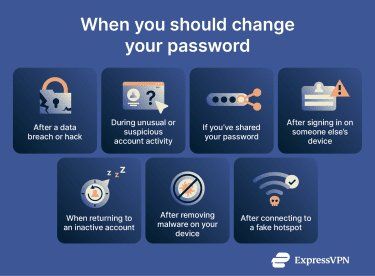
You shared your password
A shared password is no longer fully under your control. Once someone else knows it, you can’t know where it’s stored and whether that place is secure. Even if you trust the person you shared your password with, there’s no guarantee their devices are free of spyware or safe from snoops.
You logged in on someone else’s device
Using a device you don’t control introduces risks you can’t easily see. Browsers on shared machines may save passwords or autofill credentials in ways that remain accessible to others or to malicious software. Public or borrowed computers could have spyware or keylogging tools installed that can capture every keystroke you type, including usernames and passwords, without any visible signs.
You haven’t used the account in a long time
Inactive accounts carry risks that aren’t always obvious. When you haven’t logged in for months or years, you may not remember whether the password is unique, how strong it is, or whether the service has suffered a breach during that time. Older accounts also tend to rely on outdated security settings or may store passwords in ways that wouldn’t meet today’s standards.
You find malware on your device
Certain malware can log every keystroke you type, take screenshots, or pull passwords stored in your browser. Others can intercept sessions, redirect you to fake login pages, or quietly send authentication data to an attacker.
If your device is infected, any password you entered before discovering the malware may already be exposed. It’s safest to change your passwords only after you’ve removed the malware or from another device you know is clean. Note that updating them beforehand won’t help if the attacker is still capturing everything you type.
You used an unsecured public network
Public Wi-Fi doesn’t automatically expose your passwords, as most modern sites and apps protect logins with Hyper Text Transfer Protocol Secure (HTTPS). But there is still a risk if an attacker sets up a fake hotspot or redirects you to a look-alike website. In that scenario, the login page you see isn’t the real one, and anything you enter can be captured directly.
If you suspect you might have joined a fraudulent hotspot or entered your password on a page that didn’t look quite right, updating the password is a sensible precaution.
5 myths about changing your password
Password advice has shifted over time, and old myths still shape how people think about password security. Some might sound like common sense, but don't match how modern attacks work.
You only need to change your password when a service notifies you
Security alerts are helpful, but they’re not guaranteed to be timely or complete. Some breaches take months to discover, and unusual account activity isn’t always detected automatically.
If you notice signs of trouble before a service alerts you, like unrecognized logins, verification codes you didn’t request, or password reset emails, you should act immediately.
A strong password never needs to be replaced
A long, unique password is excellent protection against guessing attacks, but strength doesn’t defend against theft. Even the strongest password can be exposed through a breach, phishing page, compromised device, or fake login prompt. If the password has been captured, its complexity doesn’t matter; the attacker may have it exactly as you typed it.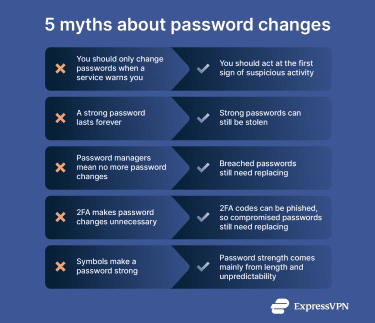
Password managers remove the need to change passwords
Password managers help store your passwords in a secure place, but you still need to update a password that’s been exposed. If a website experiences a breach or you accidentally enter your password on a fake login page, the manager can’t protect the password.
Two-factor authentication doesn’t make password changes obsolete
Two-factor authentication (2FA) is one of the strongest defenses available, but it’s not invulnerable. Attackers increasingly use phishing kits that capture both your password and your one-time code in real time, or exploit “push fatigue” to trick users into approving access they didn’t request. If your password is compromised, 2FA may slow an attacker down, but it doesn’t always prevent account compromise.
Numbers and special characters automatically make a password stronger
What matters most when it comes to password strength is length and unpredictability, not sprinkling in symbols. Short passwords, even those full of symbols, are still easy to crack with current computing power. Special characters can help, but only when they contribute to a password that’s long, unique, and hard to guess, not when they’re used as cosmetic add-ons.
Best practices for password security
Here are some basic best practices to follow for keeping your passwords safe.
Use a password manager for every account
A secure password manager helps you create and store unique passwords automatically, reducing the chance that you’ll rely on memory, reuse old passwords, or keep them in insecure places like notes apps or browsers.
Turn on 2FA
2FA or multi-factor authentication (MFA) adds an extra login step by asking you to prove your identity with something other than your password, like a code from an authenticator app or a hardware token. This makes it significantly harder for attackers to access an account, even if they do obtain your password through a breach or phishing attempt.
Create passwords that are long enough to resist cracking efforts
Modern cracking tools move quickly through short combinations. A long passphrase made of several unrelated words is both hard to guess and easier to remember without repeating predictable structures. You can also use a random password generator for convenience.
Keep your devices clean and updated
Password theft often starts with malware on a phone or computer. Updating your operating system, browser, and apps reduces vulnerabilities that attackers use to install keyloggers or steal stored passwords.
Use secure recovery options
Your password is only as strong as the recovery methods attached to your account. Make sure your backup email, recovery phone number, and security questions are accurate, private, and protected, since weak recovery details can let someone reset your password without you knowing.
Limit where your accounts stay signed in
Shared, borrowed, or public devices may store your login details or keep sessions active after you close the browser. Make sure you sign out when you’re done and remove old devices from your account’s access list.
Be careful where you enter your password
Always confirm you’re on a legitimate login page, especially if a link came through email or a message. Fake pages are one of the easiest ways for attackers to collect passwords directly.
Review your accounts periodically
Checking your account dashboards, connected devices, and security logs gives you context you wouldn’t otherwise see. It helps you catch unfamiliar activity early.
FAQ: Common questions about password changes
How do I know if my password has been compromised?
You can usually spot a compromised password through unusual activity on your account. This includes login alerts from unfamiliar locations, password reset emails you didn’t request, unexpected profile changes, or new devices linked to your account. A breach announcement from a service you use is another clear sign that your password may be exposed.
Is it safe to store passwords in a browser?
Browser storage is convenient, but it has a broader attack surface than a dedicated password manager. Browsers often sync passwords across devices tied to your account, which increases risk if someone gains access to a synced device or signs into your profile.
How can I create a secure password I won’t forget?
All you need to do is follow best password security practices: make sure the password uses a long passphrase, is unique to the account, and that you store it in a secure place, like a reputable password manager.
Should I change my Wi-Fi password, too?
You should change your Wi-Fi password if you suspect someone gained access to your network, if you recently shared it with people who no longer need it, or if your router has outdated settings.
Do I need to change my password if I use a password manager?
Yes, you still need to change your password even if you use a password manager. A manager keeps your passwords strong, unique, and securely stored, but it can’t protect a password after it has been exposed. If a service suffers a breach or you notice suspicious activity on your account, you still need to update that password right away. The manager simply makes it faster and easier to replace it.
Take the first step to protect yourself online. Try ExpressVPN risk-free.
Get ExpressVPN