How AI chatbots work, and what that means for your privacy



AI chatbots can feel like a safe space for private conversations. You might use them for important research, sensitive work tasks, or even more personal questions.
But just because those interactions feel private, it doesn’t necessarily mean they are. When you send a prompt to an AI chatbot, it’s processed on external systems. Depending on the platform, your input may be stored or reused to train the model. For more sensitive questions, that can raise privacy concerns.
Here’s a clear breakdown of how AI chatbots work, what happens to your chat data, and how to use AI more safely, including how privacy-focused AI tools like ExpressAI are designed to handle your data differently.
How AI chatbots work
AI chatbots take your input and generate a response using a machine learning (ML) model. ML models are algorithms trained on large amounts of data.
What an AI chatbot does
When you enter a prompt into a chatbot, it turns your input into tokens. Tokens are like currency within an AI chatbot, with one token typically equating to around four characters of text.
The ML model then analyzes those tokens and predicts the most helpful response, token-by-token. A simple way to think about it is advanced autocomplete; the model builds an answer step by step based on what’s most likely to come next.
Predictions are based on patterns learned from the model’s training data, plus additional techniques such as Reinforcement Learning from Human Feedback (RLHF). That’s when humans rate a model’s responses to help it learn which outputs are most useful.
These models, known as large language models (LLMs), are trained on large datasets that include books, articles, and other text sources. This allows them to learn how words relate to each other, including grammar, context, and meaning, which is what makes the responses sound natural and relevant.
Importantly, the model doesn’t “think about” or “understand” your question like a human would. It doesn’t have awareness or intent; it uses probability to generate an answer that fits the input you gave it.
It also doesn’t verify facts in real time, unless you’re using a chatbot that has access to the internet and live web searches. Even then, each word is selected based on how likely it is to follow the previous one in context, which is why responses may sometimes be incomplete or inaccurate.
What happens when you send a prompt
Every time you use a chatbot, your input goes through a short processing cycle before you see a response. The system needs to receive your message, interpret it, generate an answer, and send it back. It does this in a matter of seconds.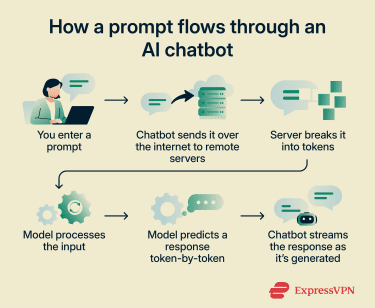
This process happens on the provider’s servers, not on your device, so your message is sent over the internet for processing. Here’s what that looks like:
- Your prompt leaves your device: Your message travels over the internet to the AI provider’s servers.
- The system prepares the conversation: Instead of looking at your message alone, the model processes the entire conversation so far. This full exchange is converted into tokens so the model can work with it.
- The model starts generating a response: The model doesn’t produce the full answer at once. It begins a loop where it predicts the next token based on everything that came before in the conversation.
- Token-by-token generation: Each new token is added to the sequence, and the model uses the updated sequence to predict the next one. This process continues step by step, like a constantly updating autocomplete.
- Streaming the response: As each token is generated, it’s sent back to your device in real time, which is why you see the response appear gradually.
- The response ends: The process continues until the model generates a special “end of sequence” signal, which tells the system the response is complete and it’s your turn again.
What happens to your data when you use AI chatbots
The way your data is treated depends on the platform you’re using and how you interact with it.
How AI platforms typically handle your data
Platforms may store prompts temporarily to keep your conversation running or keep them longer to improve the service. For example, a provider might review past conversations to fix errors, analyze how people phrase questions, or change how the chatbot handles certain types of requests.
If a chatbot includes a conversation history, your prompts are being stored so you can return to them later. Some platforms also offer temporary or private chats that don’t appear in your history, but these may still be retained for a limited time before deletion.
Some platforms feed conversations back into the model to improve its responses or ask you to give feedback on which answers you like best. Others might retain your data to personalize your experience. For example, a service might store details from previous chats so responses feel more relevant over time or carry information from one conversation to the next.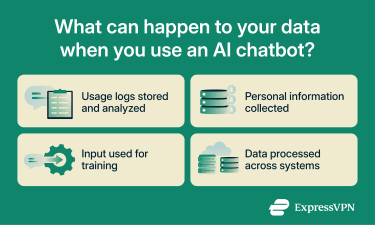
Some services use your chats to train their models by default but give you the option to opt out. That said, opting out only means your chats won’t be used for training; it doesn’t necessarily mean your data isn’t collected or stored. Your prompts, file uploads, usage logs, and identifiers like your IP address might still be retained for a period of time.
Most AI privacy policies outline how long your information is kept and when it’s deleted, but they often include exceptions. For example, providers may retain data for longer periods to meet legal or security obligations.
Do your AI prompts disappear?
Not always. Although deleting a conversation may remove it from your view, it doesn’t always erase all copies. Platforms may still retain certain data in logs, backups, or processes used to improve the service.
Can you actually delete your AI data?
Most platforms give you options to delete your data or chat history. Some features are also designed to limit retention; for example, ChatGPT has a Temporary Chat mode that automatically deletes conversations after a set period of time.
In certain regions, you have the legal right to request that companies delete your personal data. For instance, the General Data Protection Regulation (GDPR) grants EU citizens the “right to be forgotten,” while the U.S. California Consumer Privacy Act (CCPA) includes the “right to delete.”
However, how deletion works in practice also depends on the provider and the legislation. Both the GDPR and CCPA allow for exceptions based on business security practices or legal compliance.
Data rights legislation also usually applies to personally identifiable information (PII). Some AI platforms use data anonymization or aggregation, potentially allowing them to continue to store your data based on the premise that it can’t be linked back to you.
Is it safe to share personal information with AI?
It depends on how sensitive the information is and what the AI platform’s privacy policy says.
Data such as work documents, client information, financial details, legal questions, or health records may carry additional privacy considerations depending on how the platform stores and processes data. Some platforms may remove identifying details before using data for model training, but this can vary.
In addition to privacy concerns, there are also some security factors to be aware of. AI chatbots often rely on APIs to connect with other services, such as cloud storage, databases, or third-party tools. If these APIs aren’t properly secured, they could be exploited in a data breach, potentially exposing your information.
LLMs can also be vulnerable to reverse engineering. That means attackers might be able to create prompts that force the model to return information from its training data, which, in rare cases, could increase the risk of unintended data exposure.
Low risk sharing
These types of prompts usually have minimal privacy impact:
- General knowledge queries: Questions like “What’s the capital of France?” or “How does inflation work?”
- Universal tasks: Help with generic activities like coding or educational explainers that don’t require any identifiable data.
- Hypothetical or fictional scenarios: Creative queries that don’t relate to real people or real information.
When to be cautious
A good rule is to avoid sharing anything with an AI chatbot that you wouldn’t post publicly online. Some examples include:
- PII: Your name, address, phone number, ID details, or anything that could identify you
- Confidential work data: Internal documents, client information, or anything covered by company policies or NDAs.
- Financial, legal, or health information: Bank details, legal issues, medical questions, or anything sensitive.
- Personal or private topics: Messages, images, videos, relationship information, or opinions that you wouldn’t normally share in public.
How ExpressAI protects your privacy
AI tools often rely on collecting and using data as part of how they work. ExpressAI is different. It uses known and trusted LLM models but runs them in a privacy-focused environment to limit how your data is accessed and used.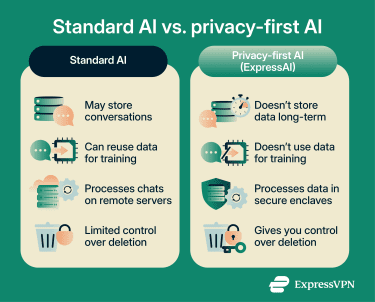
Encrypted and secure processing
ExpressAI uses confidential computing to process prompts and responses inside a secure enclave: a private computing environment shut off from the AI operator, third parties, and ExpressVPN itself. This means that no one but you can access your chats or data.
Your data is also encrypted in transit and during processing, so it stays protected while it moves through the system and while it’s being used to generate a response. Any files you upload are protected by the same zero-access encryption principles as your prompts.
Zero data retention
ExpressAI processes your inputs and outputs without storing them long-term. This reduces exposure and also avoids the default behavior of many AI tools, which typically keep conversations unless you delete them yourself.
If you do want to keep conversations, ExpressAI allows you to store them in an encrypted vault. You set the password, and only that password can unlock your chat history.
Alternatively, you can use ghost mode and set conversations to delete automatically, so they don’t remain in your history after the session ends.
No training on your conversations
ExpressAI doesn’t use your input for training or feed your data back into model improvement systems. Your prompt stays tied to your request, rather than becoming part of a larger dataset used to shape how the system responds in the future.
How to use AI chatbots more safely
Using AI chatbots doesn’t have to mean giving up control of your data. You can help reduce risk and keep your information more private with a few simple habits.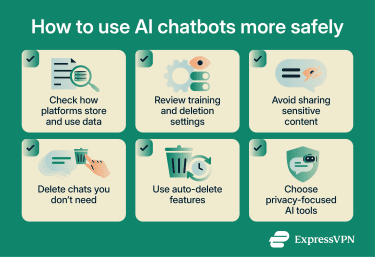
Understand platform policies
Check privacy policies before using AI chatbots, so you know how your data is used and retained
- Check whether conversations are stored and for how long.
- Look at whether your data is used for training or improving the model.
- Understand what deletion options are available and how they work.
For example, ExpressAI’s privacy policy outlines exactly how your data is processed and protected.
Be mindful of what you share
Unless you’re using a privacy-first AI service that protects your data, it’s safest to treat chatbots like public forums.
- Avoid sharing sensitive data.
- Don’t include identifiable details like your full name, address, or ID information.
- Be cautious with work-related content, especially internal documents or client data.
- Check that file uploads like images, videos, or screenshots don’t include private information.
Review data and privacy settings
You can also reduce risk by controlling what stays in the system.
- Delete chats you no longer need.
- Use temporary or auto-delete features.
- Avoid uploading sensitive files unless it’s necessary.
Use privacy-focused AI tools
Some platforms are designed to reduce data exposure and give you more control. For example, ExpressAI is designed with these protections built in. It limits data retention by default and doesn’t store your conversations or use any information to train its model. It also encrypts your data and processes it in a secure, isolated enclave so that no one else can read it.
Read more: How to get started with ExpressAI
FAQ: Common questions about AI chatbot privacy
Do AI chatbots store your conversations?
Can AI chatbots use your data for training?
Can you delete your AI chat history completely?
Is it safe to upload files to AI tools?
For example, ExpressAI applies the same zero-knowledge encryption to uploaded files as it does to chat data, so not even ExpressVPN or the AI models can access them.
What happens to the data you enter into AI tools?
Take the first step to protect yourself online. Try ExpressVPN risk-free.
Get ExpressVPN