Can you trust AI-generated content? Understanding accuracy and limitations



AI chatbots can draft a cover letter in seconds, summarize long documents, or debug a script that's been breaking your build all morning. While these tools can save time and support productivity, they also raise important questions about accuracy, reliability, and oversight.
This guide explains how AI-generated responses are created, highlights common points where errors can occur, and outlines practical ways to check and verify the content.
How does AI generate content?
When you type a question, a typical AI chatbot doesn't look up the answer in a database. Instead, it generates a response one token at a time (tokens are fragments of words, usually a few characters each) by predicting what comes next based on patterns it learned during training.
This prediction process relies on a mechanism called attention, which lets the model weigh different parts of your input against each other to figure out what matters most. It also helps the model interpret words in relation to one another, so one part of the input can shape the meaning of another. For example, if you ask, "Why is my mouse not working?", attention helps the model recognize that "not working" makes "mouse" about a device, not an animal, and it steers the response toward troubleshooting tips rather than rodent facts.
Under the hood, this is purely mathematical. Large language models (LLMs) operate through statistical pattern recognition rather than human-like understanding. During training, they convert words into numerical representations, called embeddings, and map them in a high-dimensional space.
Early language models often represented meaning by placing words that frequently appeared in similar contexts close together in an embedding space. Modern LLMs still use embeddings, but their internal representations are far more contextual. Instead of giving each word a fixed meaning based mainly on co-occurrence, the model continuously reshapes its interpretation depending on the surrounding text. In practice, this means it learns which words and structures can substitute for or relate to one another in a given context, helping it generate output that fits both the meaning and syntax of the prompt.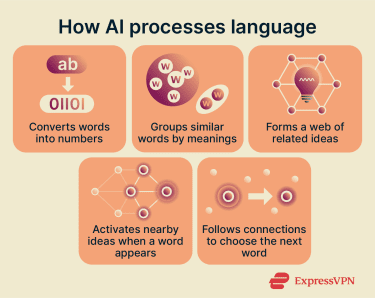
These patterns are learned from massive training corpora made up of text from web pages, forums, code repositories, libraries, archives, and other licensed or curated sources. Models are often further refined afterward through post-training methods such as fine-tuning with human feedback.
The scale is enormous, but the training data still represents a fixed snapshot in time. Models learn from what existed up to a cut-off date, which means they can miss recent events, reflect outdated consensus, or underrepresent topics that had limited coverage in the data they were trained on.
Learn more: Read our full guide to machine learning.
Why does AI make mistakes sometimes?
AI output is often reliable for everyday tasks, such as drafting emails, brainstorming ideas, or explaining well-documented concepts. The problems start when a question pushes beyond what the model has strong training data for or when precise accuracy matters.
One limitation is that LLMs don’t independently verify their output. When the model has limited grounding for a response, it may still generate an answer that sounds plausible but includes errors. These types of errors are often called hallucinations.
Hallucinations can take several forms. A model might fabricate sources that don't exist, present outdated facts as current, blend details from unrelated events into a single narrative, or state something flatly incorrect with no hedging.
Several factors make hallucinations more likely: prompts about niche or obscure topics where training data is thin; ambiguous questions that force the model to guess your intent; tasks that require precise, verifiable facts like dates, legal citations, or statistics; and questions about recent events that postdate the model's training cutoff.
The industry is actively working to reduce these errors through better training data curation, fine-tuning on domain-specific datasets, and adding self-correction mechanisms that let models review their own output before presenting it.
How to spot when an AI chatbot response may be inaccurate
Even when a response reads fluently, it's worth pausing to evaluate it, especially for tasks where accuracy matters. A few questions can surface most problems:
- Does the response actually answer what you asked? Vague or generic replies that skirt around your specific question are a common sign that the model didn't have strong data to draw on. If you asked for a comparison and got a summary, or asked for steps and got an overview, the model may be filling in rather than answering.
- Is the response internally consistent? Look for contradictions: a date that shifts between paragraphs, a claim that gets quietly reversed in the explanation that follows, or a number that changes when restated.
- Does anything seem surprisingly confident? When a model presents a nuanced or contested topic with no caveats, qualifications, or acknowledgment of uncertainty, treat it as a flag.
- Can you verify the key claims? It’s helpful to ask the model to cite its sources. When it does, check that the source exists and says what the model claims. LLMs can fabricate convincing-looking references that are entirely invented. A quick search is often all it takes to catch these.
- Are the sources high-quality and close to the original evidence? Even when a source is real, it may still repeat inaccurate or AI-generated claims from elsewhere. To avoid that loop, prioritize primary and high-quality sources whenever possible.
 When any of these checks raises doubt, here are concrete next steps:
- Rephrase and re-ask: Pose the same question differently, or start a temporary chat, which resets the conversation context. If the response changes significantly, the model was likely guessing. If it stays consistent, the information is more likely grounded.
- Turn on web search: Most AI platforms offer a web search toggle in the chat interface. Enabling it lets the model pull in live information rather than relying solely on training data, which reduces the risk of outdated or fabricated claims. Compare the cited web results against the model's answer to check for alignment.
- Check outside the AI entirely: For anything high-stakes, look up key details independently. A search engine, a primary source document, or a subject-matter expert can provide context that the model may have missed or misrepresented.
How to reduce errors before they happen
Beyond catching problems after the fact, a few techniques can meaningfully reduce errors at the prompt level.
1. Choose the right model for the task
Not all models are equally suitable for all tasks. A model optimized for code generation may underperform on nuanced writing; a model designed for everyday conversation may struggle with multi-step reasoning. Matching the model to the task is one of the simplest ways to improve accuracy, and mismatching is one of the most common causes of poor output.
In ExpressAI’s selection of models, for example, Nemotron 12B is optimized for math and code, DeepSeek R1 Distill 32B for careful multi-step reasoning, Qwen2.5-VL 32B for analyzing images, charts, and diagrams, Qwen3.5 35B-A3B for coding, math, and complex problem-solving, and GPT OSS 120B is for general writing and summarization.
Choosing the right starting point means the model is less likely to fall back on generic patterns when it hits something outside its strengths.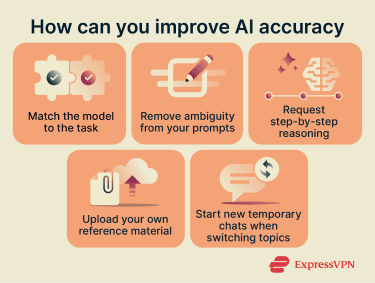
2. Ask for step-by-step reasoning
Chain-of-thought (CoT) prompting encourages the AI to break down a problem step by step instead of jumping straight to a final answer. This typically reduces logical errors and unsupported conclusions, because the intermediate steps make it easier, both for the model and for you, to spot exactly where reasoning goes wrong.
You can trigger this with simple additions to your prompt: "Explain your reasoning step by step," "Walk through this problem one stage at a time," or "Before giving your final answer, list the assumptions you're making." You can also outline the specific steps you want the model to follow or include a worked example so it has a clear structure to mirror.
Some platforms offer this as a built-in feature (often labeled "deep thinking," “extended thinking,” or "deep research") that you can enable directly from the chat interface. These modes typically allocate more processing to reasoning before the model commits to an answer, which can noticeably improve accuracy on complex or multi-part questions.
3. Be specific in your prompts
Ambiguous prompts produce ambiguous results and give the model more room to guess, which is where errors creep in. A clear prompt defines what you want, what format you need, and what constraints apply.
| Ambiguous prompt | Detailed prompt |
| Make this text more engaging. | Rewrite this section for a general audience. Use short sentences, avoid jargon, and keep it under 500 words. Add bullet points for key ideas and include real-life examples to explain the main concept. |
4. Manage long conversations carefully
Every AI model has a context window: the total amount of text it can hold in working memory during a single conversation. This includes everything: your messages, the model's replies, any system instructions running in the background, and uploaded files. Current limits vary widely by model, from roughly 32,000 tokens on smaller models to over a million tokens on some frontier models (as a rough guide, 1,000 tokens is approximately 750 English words).
When a conversation grows long enough to approach this limit, the model begins losing track of earlier details and may fill the gaps with less accurate content. This is called a “lost-in-the-middle” effect: LLMs tend to pay the strongest attention to information near the beginning and end of their context, while recall drops significantly for material in the middle.
In practice, this means that long conversations with many follow-up questions, topic branches, or large pasted documents can cause the model to quietly overlook earlier instructions or key details, even if the context window isn't technically full.
The simplest fix is to start a new chat when you change topics. For longer tasks, periodically ask the model to summarize the key points so far. This moves important information back to a recent position in the conversation, where the model is most likely to retain and use it accurately.
5. Provide your own source material
Instead of relying entirely on the model's training data, upload the documents, reports, or data you want it to work from. This grounds the response in information you control and trust and reduces the chance of the model pulling in unrelated or outdated material.
Most AI tools now support multimodal inputs (PDFs, text files, code files, images) directly in the chat. You can also paste in excerpts or include links. For best results, point the model to what matters most: "Summarize the key findings from the attached report" or "Use only the information in section 3 to answer this question."
Narrowing the scope means the model has less reason to improvise beyond what you've provided.
How to use ExpressAI for the best results
ExpressAI lets you ask detailed questions on any topic. You can also attach documents, use web search, and compare different models on the fly to assess which one gave you the best answer.
Use ExpressAI's side-by-side comparison view to catch what one model misses
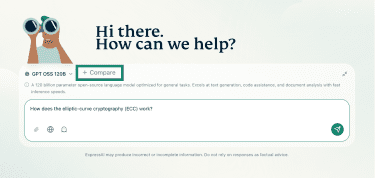
ExpressAI’s side-by-side comparison lets you send the same prompt to multiple models and display their responses next to each other, making differences easy to spot.
- Open ExpressAI, enter the prompt (it can be refined later), and click Compare.
- Select the models to compare.
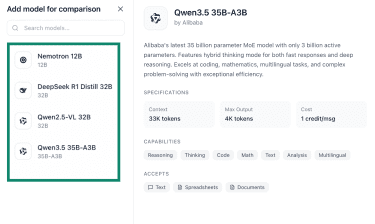
- Review the selected options (add or remove models if needed), then click the green arrow to run the comparison.

- Compare the results. When models agree on a factual point, confidence in that information increases. When they differ, it highlights areas that require closer review.

Attach files for grounded answers
You’ll first need to create a primary password by clicking Set Primary Password in the right-side tab or use ghost mode (the ghost icon below the chatbox) to upload documents. Ghost mode automatically deletes a conversation after you start a new chat.
To upload a document, click the paperclip icon, select files from your device, and confirm. The model will draw on the content you provide, reducing its reliance on training data and giving you more control over the accuracy of its response.
Enable web search for current information
To pull in live information, click the globe icon before sending your query.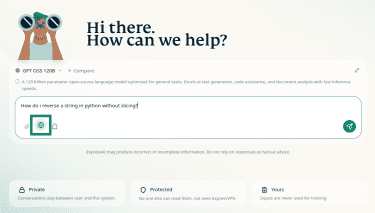
The model will gather relevant results from the web along with citations, helping you verify claims and ensure answers reflect the most up-to-date information available.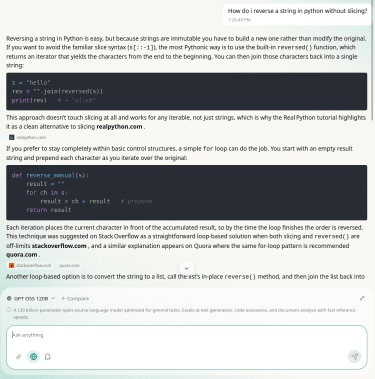
Read more: Learn how to use ExpressAI on mobile
When should you use vs. not use AI?
AI results vary widely depending on the task, the context, and where AI fits within your workflow. As a general rule, AI works best when you already have background knowledge on the topic, enough to spot a hallucination or a gap when one appears. Understanding which tasks AI handles well and where it tends to fall short helps you make that judgment on a case-by-case basis.
Where AI works best
LLMs are available around the clock, respond instantly, and can handle large volumes of text with ease. That makes them especially useful for everyday, lower-stakes tasks where speed matters and small imperfections are tolerable.
- Brainstorming: AI accelerates the creative process, generating multiple angles, exploring variations, and helping you refine rough ideas through quick back-and-forth. It's especially good at helping you branch out when you're stuck.
- Proofreading and rewriting: In English, LLMs reliably catch grammar, punctuation, and spelling mistakes. You can also use them to restructure your writing for clarity, adjust tone, or adapt content for a different audience.
- Language tasks: Many models support widely spoken languages well, including Chinese, Japanese, and Arabic. You can use them to practice conversations, learn grammar in context, translate phrases, or get explanations of idiomatic expressions.
- Summarizing information: AI quickly condenses long documents and extracts key points, even at scale. It works best for summaries where small omissions won't materially change the takeaway.
- Research support: AI can clarify concepts, break down technical topics into accessible language, and help you explore unfamiliar subjects alongside primary sources.
- Data analysis: AI can identify patterns, flag anomalies, and organize large datasets to support decision-making. For example, it can spot recurring themes in survey feedback, categorize large volumes of notes, or help structure messy data. AI-assisted analysis is already being used in professional contexts such as healthcare screening, though human review remains essential.
- Automating repetitive work: Routine, predictable tasks (drafting templated emails, generating consistent formatting, filling in repetitive documents) are a natural fit for AI, freeing up your time for work that requires judgment.
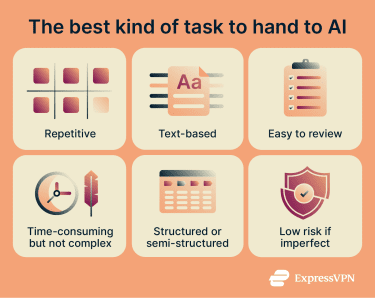
Where AI can go wrong
AI's limitations tend to surface in situations that require precision, nuance, or up-to-date domain expertise. It's worth being especially cautious in these areas:
- High-accuracy tasks: When small errors carry outsized consequences (calculating taxes, reviewing contract terms, verifying compliance), AI's lack of guaranteed accuracy makes it risky as a sole tool. Use it to assist, but verify the output independently.
- Foundational learning: If you're new to a subject, AI explanations can sometimes be incomplete or simplified. Without prior knowledge, it’s harder to spot errors, which can lead to misunderstandings.
- Original creative work: AI generates content by recombining patterns it has already seen. It's excellent at producing variations and remixes but less helpful for novel creative concepts, unconventional arguments, or fresh strategic angles.
- Nuanced judgment: AI can oversimplify complex situations or give generic advice that doesn't account for your specific circumstances. Tasks that require judgment or interpreting nuance are less reliable.
- Professional advice: Fields like medicine, law, and finance require context-dependent expertise and current information, so human expert review is essential.
- Sensitive or confidential information: When sharing personal, financial, or proprietary data with an AI tool, it's important to understand the provider's data policies. Some platforms use conversations to improve their models; others anonymize data but still retain it. ExpressAI takes a different approach: every chat is processed inside an isolated, encrypted secure enclave, and no data is retained or used for training. If you're working with sensitive material on any platform, check the provider's policies before sharing.
FAQ: Common questions about trusting AI-generated content
Can AI-generated content be trusted?
Why does AI sometimes give wrong answers?
How can I check if the AI output is accurate?
Take the first step to protect yourself online. Try ExpressVPN risk-free.
Get ExpressVPN